Understanding the communication gap
Indonesia has more than 22.97 million people with disabilities, with the deaf/speech-impaired community as one of the largest groups — yet certified sign language interpreters remain scarce. That gap forces Deaf Friend and Speech Friend to depend on a companion for public interactions and for private, sensitive moments like a doctor's visit.
Existing solutions treat this as one problem, offering the same generic interface to someone who relies entirely on visual cues (Deaf Friend) and someone who can hear but struggles to speak (Speech Friend) — even though their communication needs are fundamentally different.
"When a Deaf patient comes in alone and in pain, we struggle to ask about drug allergies or how the injury happened."
"Almost two-thirds of Deaf telehealth users still hit communication barriers, even on a virtual care platform."
Validating the barriers
n = 36 (Deaf Friend/Speech Friend, general public, medical staff). Biggest reported barrier to talking with hearing people: not knowing sign language and fear of being misunderstood (68.2% each).
92.8%
of Deaf Friend/Speech Friend respondents report frequent difficulty or misunderstanding in public.
64.3%
go to the doctor alone rather than with a companion, emphasizing the need for independent communication.
100%
of medical staff say language barriers risk delayed/wrong treatment.
86.1%
interested in a multi-voice, color-coded live caption feature.
72.2%
say a 3D body map to mark pain would help more than typing.
86.1%
would use a manual drawing/typing fallback if AI camera fails.
Defining the core challenges
Based on the research findings, we identified two critical "How Might We" (HMW) statements to guide our ideation:
HMW #1
How might we help a patient describe pain location and severity accurately without relying on typing while in distress?
HMW #2
How might we ensure communication remains uninterrupted when the AI fails to read a gesture due to poor lighting or a weak signal?
Ideation & Key Decisions
After a round of Crazy 8s and dot voting, we decided to pivot from two separate apps to a single adaptive app. Here are the core solutions we landed on:
One adaptive app, not two
Splitting into a "Deaf app" and a "Speech app" would isolate the two groups from each other and from hearing peers. Instead, Dynamic Onboarding sets a sensory profile once, and the interface — captions on or off, camera-first or voice-first — adapts from there.
3D Symptom Mapping over typing
64.3% go to the doctor alone, and typing a detailed complaint while in pain is exactly the friction that pushes people back toward bringing a companion. Marking pain on a 3D avatar plus a severity scale replaces that typing.
Fallback is not optional, it's core
92.8% hit communication trouble in non-ideal conditions — crowded rooms, bad lighting. The Papan Interaktif (manual draw/type canvas) and Frasa Cepat aren't an edge case UI, they're a permanent, always-reachable layer for when computer vision fails.
A confirmation step before medical terms ship
Because 100% of medical staff linked language barriers to delayed or wrong treatment, Medical AI Fail-safe shows a pop-up to confirm what the AI captured before it reaches the doctor — cutting the highest-risk failure mode out of the flow.
Prototyping & Scenarios
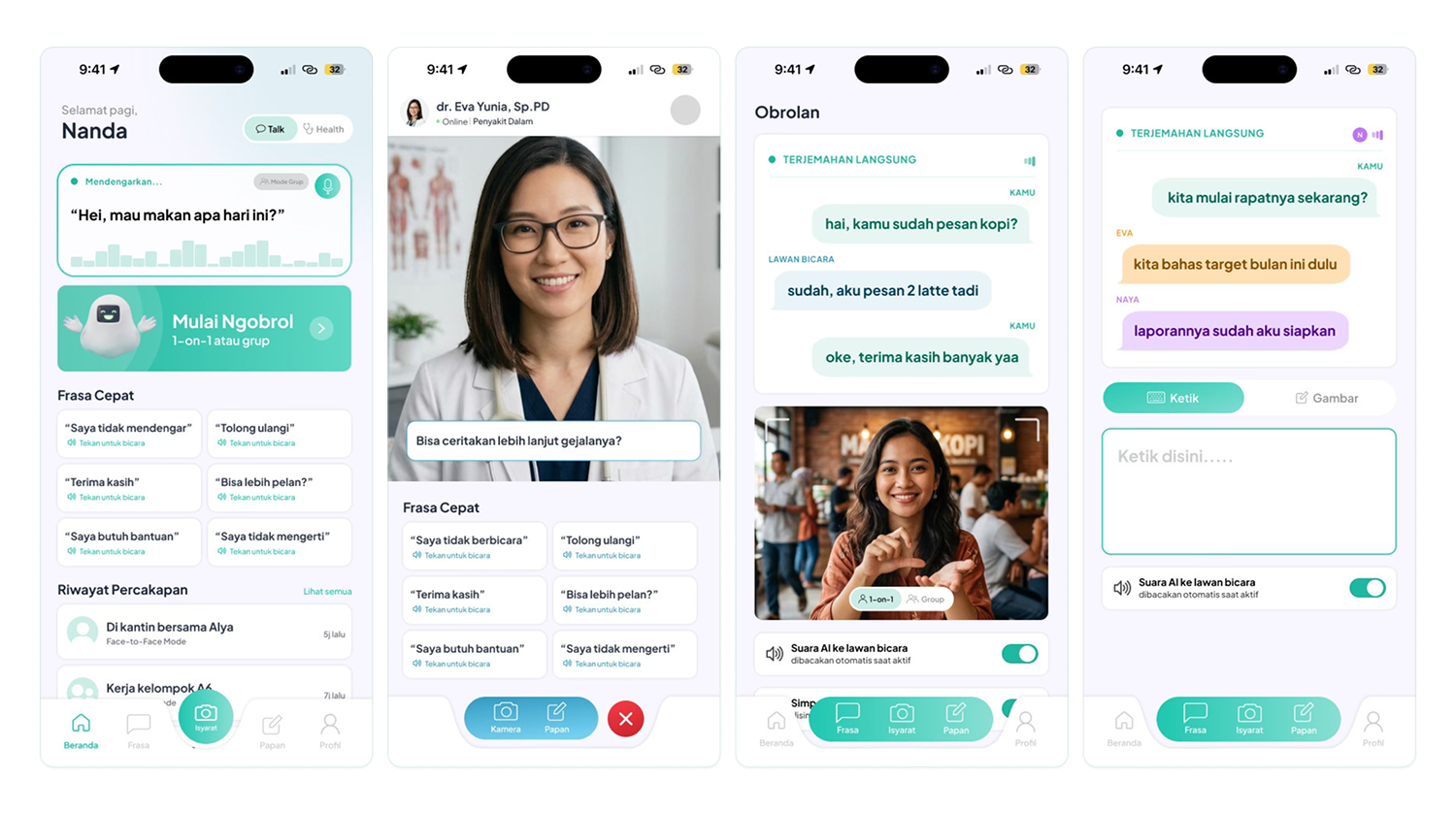
We moved from low-fidelity wireframes to a fully documented high-fidelity system. Below is how the interface adapts to different user scenarios.
Ordering coffee, 1-on-1
Nanda opens Svara Talk in 1-on-1 mode. The front camera reads her sign in real time, the AI turns it into text and speech for the barista, and the barista's reply is captioned back to her live — no more passing a phone back and forth to type.
Drive-thru order
Same sign-to-text camera, but because Dimas can hear, the Listening Box/caption layer stays off — he just listens to the cashier directly. When the camera struggles to read his hands, he drops to Frasa Cepat or the manual board without breaking the exchange.
A meeting without a human interpreter
Up to four participants, each captioned in their own color. Nanda still needs live caption to follow hearing speakers; Dimas doesn't. Voice Isolation and Voice Match filter out room noise so only registered speakers get transcribed.
Remote consultation
Dimas marks the pain area on a 3D anatomy avatar instead of typing a description, picks a specialist, and joins a video consult — no live subtitle needed since he hears the doctor directly. His signed answers are converted to speech, confirmed via the Fail-safe pop-up, then logged to his Medical Passport.
Final polished UI
Outcome & Reflection
What the survey validated
The three highest-conviction features weren't guesses: 86.1% wanted multi-voice color captions before Group Sync was designed, 72.2% preferred a body map over typing before 3D Symptom Mapping existed, and 86.1% wanted a manual fallback before the Papan Interaktif was built.
What I'd do differently
Every insight so far comes from a self-report survey (n=36), not moderated usability sessions with the Deaf community. I'd run think-aloud testing directly with Gerkatin members and a live pilot with one clinic before locking the Medical AI Fail-safe interaction, since the highest-risk feature is the one we've validated the least.
What I learned
Designing "one app" for two different sensory profiles isn't the same as designing one interface twice. The hardest calls weren't visual — they were about when to show a caption and when to hide it, when a fallback is a backup and when it needs to feel just as first-class as the AI path. The BISINDO/SIBI dataset is still smaller than ASL's, and the interpretation risk in a medical context is real, so the honest scope of v1 is daily conversation plus basic medical vocabulary — not a replacement for a certified interpreter yet, but a bridge for the moments no interpreter is there.